


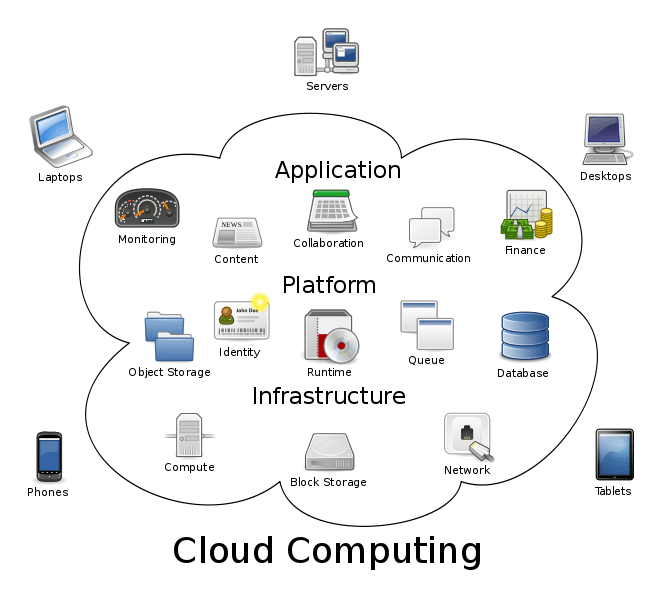
Cloud computing is one of the most influential technologies shaping how the modern internet operates, yet it remains misunderstood by many beginners. While the term “cloud” sounds abstract or technical, the reality of cloud computing is practical, logical, and deeply integrated into everyday digital life.
Every time you send an email, stream a movie, save files online, or use an app without installing it on your device, cloud computing is working behind the scenes. This article explains cloud computing in complete detail, starting from the basics and gradually moving toward advanced concepts, so even first-time learners can fully understand it.

What Is Cloud Computing?
Cloud computing is the method of delivering computing services through the internet instead of using physical hardware or local servers. These services include data storage, processing power, databases, networking, software applications, analytics tools, and security systems.
In traditional computing, users were responsible for buying computers, installing software, storing files locally, and maintaining hardware. Cloud computing shifts these responsibilities to remote data centers, allowing users to access powerful computing resources on demand.
In simple terms, cloud computing allows you to use technology as a service, rather than owning and managing it yourself.
Why Is It Called “Cloud” Computing?
The word “cloud” comes from early network diagrams where the internet was represented by a cloud symbol. This symbol indicated something external, distant, and not directly controlled by the user.
The cloud represents:
-
Remote servers
-
Hidden infrastructure
-
Automated systems
-
Scalable resources
Users do not need to know where servers are physically located or how they are maintained. They simply connect through the internet and use the service.
How Cloud Computing Works (Detailed Explanation)
Cloud computing functions through a highly coordinated system of servers, networks, software, and security mechanisms.
Here is a step-by-step breakdown of how it works:
-
A user opens a cloud-based service using a browser or app
-
The device sends a request over the internet
-
The request reaches a cloud provider’s data center
-
Servers authenticate the user and process the request
-
Data is stored, retrieved, or calculated
-
Results are delivered back to the user instantly
All of this occurs in seconds, without requiring the user to manage hardware or software updates.
Traditional Computing vs Cloud Computing (In Detail)
| Aspect | Traditional Computing | Cloud Computing |
|---|---|---|
| Hardware | Owned by user | Managed by provider |
| Software | Installed manually | Accessed online |
| Maintenance | User responsibility | Provider responsibility |
| Cost | High upfront investment | Pay-as-you-go |
| Scalability | Limited | Highly scalable |
| Accessibility | Single device | Any device, anywhere |
Cloud computing removes technical barriers and makes advanced technology accessible to everyone.
Types of Cloud Computing Explained Thoroughly
Cloud computing systems are categorized by deployment models, which determine how resources are shared.
Public Cloud (Full Explanation)
Public cloud services are owned by third-party providers and shared among multiple users. These services operate on large-scale infrastructure designed to support millions of users simultaneously.
Public clouds are ideal for:
-
Individuals
-
Startups
-
Small and medium businesses
They offer:
-
Lower costs
-
Easy setup
-
High scalability
-
Global accessibility
Private Cloud (Full Explanation)
Private cloud systems are dedicated to a single organization. They may be hosted internally or by a third-party provider, but access is restricted.
Organizations choose private clouds when they require:
-
Strict security controls
-
Regulatory compliance
-
Custom infrastructure
-
Full data ownership
Private clouds are common in finance, healthcare, and government sectors.
Hybrid Cloud (Full Explanation)
Hybrid cloud combines both public and private cloud environments. This allows organizations to balance cost efficiency with data control.
For example:
-
Sensitive data stays private
-
Less critical workloads run on public cloud
Hybrid cloud systems provide flexibility and strategic control.
Cloud Service Models (Explained Deeply)
Cloud services are also classified by service models, which define how much control users have.
Infrastructure as a Service (IaaS)
IaaS delivers basic computing resources such as:
-
Virtual servers
-
Storage
-
Networking components
Users control:
-
Operating systems
-
Applications
-
Security configurations
This model is commonly used by developers and IT teams.
Platform as a Service (PaaS)
PaaS provides a complete development environment without requiring infrastructure management.
It handles:
-
Server maintenance
-
Software updates
-
Scaling
-
Security patches
Developers focus entirely on building applications.
Software as a Service (SaaS)
SaaS delivers fully functional software through the internet.
Users:
-
Do not install software
-
Access applications via browser
-
Receive automatic updates
Common SaaS examples include email platforms, productivity tools, and collaboration software.
Real-World Examples of Cloud Computing
Cloud computing powers many everyday services, including:
-
Email systems
-
Streaming platforms
-
Online banking
-
Cloud storage
-
Social media networks
If you want to understand the business side of online platforms, this internal guide explains it clearly:
👉 How Do Websites Make Money? Explained Simply
Benefits of Cloud Computing (In-Depth)
Cost Efficiency
Cloud computing reduces capital expenses by eliminating the need for physical infrastructure.
Accessibility
Users can access services from any location and device.
Scalability
Resources can expand or shrink based on demand.
Reliability
Cloud systems use redundancy to ensure uptime.
Automatic Updates
Software updates are handled by providers.
Cloud Computing and Security (Detailed Insight)
Security is a major concern, but cloud providers invest heavily in protecting data.
Security measures include:
-
Data encryption
-
Identity verification
-
Access control systems
-
Continuous monitoring
-
Compliance audits
User behavior still matters. For related digital safety guidance, read:
👉 Is Public WiFi Safe? What You Should Know
Cloud Computing in Business Operations
Businesses rely on cloud computing for:
-
Remote collaboration
-
Data analysis
-
Product development
-
Customer management
-
Disaster recovery
Cloud computing enables startups to compete with large enterprises by lowering entry barriers.
Cloud Computing and Artificial Intelligence
Artificial intelligence depends on cloud computing for:
-
Data storage
-
Model training
-
High-performance processing
To understand AI basics, see this internal guide:
👉 What Is Artificial Intelligence in Simple Words?
https://simpcityu.com/what-is-artificial-intelligence/
Common Myths About Cloud Computing
❌ Cloud data floats in the air
❌ Cloud computing is unsafe
❌ Only tech experts can use it
All of these myths are incorrect. Cloud computing is structured, secure, and user-friendly.
External Authority Sources (EEAT Boost)
For expert-level references:
Future of Cloud Computing
Cloud computing continues to evolve with:
-
Edge computing
-
AI integration
-
Automation
-
Advanced security models
It will remain foundational to digital innovation.
Final Conclusion
Cloud computing has transformed how people interact with technology. By removing complexity, reducing costs, and increasing accessibility, it has become a cornerstone of the modern digital ecosystem.
Understanding cloud computing equips individuals and businesses to navigate technology with confidence and clarity.

