


Pixar has created some of the most financially successful animated films of all time. Four movies have grossed over $1 billion and joined the ranks of the 50 highest-grossing films ever made. The studio’s 2018 release, Incredibles 2, stands as the highest-grossing animated movie at the North American box office in the last 40 years.
The numbers tell a compelling story about Pixar Animation Studios’ influence on the industry. Their feature films have earned over $15 billion at the worldwide box office and average an impressive $589 million per film. The global 3D animation market grew by 6.2% between 2017 and 2020, reaching a value of 70 billion U.S. dollars.
This piece explores how Pixar films come alive through their sophisticated animation process. The journey started with Toy Story, which needed 117 computers running constantly to render the film. The studio’s development of proprietary software like Presto and Renderman shows how Pixar Animation Studios combines storytelling with innovative technology to create their movie magic.
From Storyboard to Script: The First Step in Pixar’s Process
A solid narrative foundation forms the core of every Pixar masterpiece. The studio builds this foundation before adding striking visuals and technical elements. Each story starts as a basic concept, sketch, or question.
How Pixar develops story ideas
Pixar’s “Brain Trust” – a group of seasoned directors, writers, and creative leads – shapes each project from the start. These talented individuals cooperate to develop and refine story concepts.
Story ideas emerge from everywhere – personal experiences, observations, and simple “What if?” questions. Toy Story started with “What if toys were alive when people weren’t around?” and Inside Out explored “What if emotions were characters inside your head?”
The writers create a treatment once a concept shows promise. This detailed outline captures the story’s essence and helps guide the creative team through the complex process of narrative development.
The role of storyboards and story reels
Pixar artists create storyboards after developing the original story concept. These hand-drawn sketch sequences serve several significant functions:
- They establish the visual flow of scenes
- They help identify potential story problems early
- They allow directors to experiment with different camera angles and compositions
- They serve as a visual script for the animation team
The team films these storyboards in sequence and adds temporary dialog and sound effects to create a “story reel.” This rough animated version lets filmmakers assess the story’s pacing, effect, and overall structure before full animation begins.
Creating emotional arcs and character journeys
Character development stands at the heart of every Pixar film. The storytellers craft detailed character backgrounds, motivations, and flaws. They often develop more material than what appears on screen.
Pixar’s characters undergo meaningful transformations through clear emotional arcs. The studio’s motto “Story is king” reflects their steadfast dedication to emotional storytelling that appeals to audiences of all ages.
Pixar films go through numerous revisions during this original phase. Directors and writers readily discard entire sequences or start fresh if the story doesn’t work. This dedication to storytelling excellence explains their consistent delivery of commercial success and emotional depth.
Building the World: Modeling, Rigging, and Design

Image Source: Rokoko
Pixar’s visual storytelling excellence stems from their sophisticated approach to building digital worlds. Their methodology blends artistic vision with advanced technology to create that distinctive look and feel audiences recognize in Pixar animation.
3D modeling with AutoDesk Maya
Pixar uses Autodesk Maya, one of the industry’s most powerful 3D modeling and animation software tools. The studio collaborated with Autodesk to develop Presto, their proprietary animation system that matches their creative needs perfectly. Maya stands out because of its flexibility and easy modification options, which makes it the top choice for large studios and independent artists alike. Artists can write custom scripts and tools to streamline their workflow and tackle complex projects efficiently.
Creating detailed character meshes
Pixar’s character creation process starts with a wireframe that defines the basic shape and structure. Artists build layers of detail, add textures, colors, and surface features. They employ subdivision techniques to gain better control over complex curves and surfaces by increasing mesh point density. Pixar’s OpenSubdiv technology makes this process faster by enabling high-performance subdivision surface evaluation on parallel CPU and GPU architectures. The meshes become densest at complex features, especially character faces, which gives artists precise control over expressions and movements.
Rigging characters for realistic movement
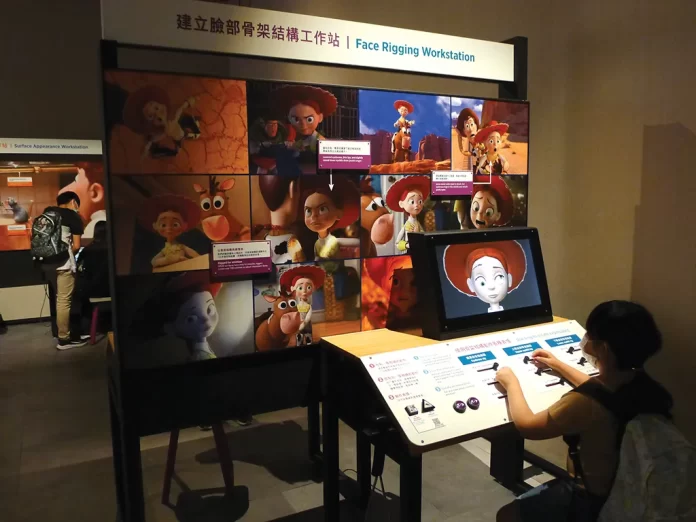
Character rigging adds the virtual skeleton that brings characters to life. Brian Green, a Rigging Technical Director at Pixar, describes rigging as “a process of adding controls to a digital model to allow animators to move it around and act”. The rigging team studies character movements based on story requirements and creates hundreds of control points for animators to create poses. They build complex systems of virtual bones, joints, and muscles that determine how character parts interact with movement. A character’s smile, to name just one example, triggers the rig to move the lips, bulge the cheeks, and crinkle the skin around the eyes.
Designing environments and props
Pixar’s set designers work as virtual architects who build detailed environments from scratch. Each element contributes to creating believable worlds, from tiny pebbles to entire buildings. The team models some set pieces individually like characters, while others emerge through procedural computer programs. Environment design plays a significant role in storytelling because each scene’s setting conveys context, emotional tone, and enriches the narrative.
Bringing Characters to Life: Animation, Shading, and Simulation
Pixar brings its characters to life through complex animation after rigging them. The studio’s animators take a bottom-up approach. They start with body language to express emotion and add facial expressions as finishing touches.
Animating facial expressions and body language
The studio’s original inspiration came from psychologist Paul Ekman’s Facial Action Coding System to create accurate expressions. The animators think over and amplify emotional reactions to boost storytelling clarity. They highlight extreme expressions and remove unclear muscle movements. Pixar’s animation team often looks in mirrors while developing facial expressions, just like Disney legend Norm Ferguson did when he studied angry looks.
Simulating hair, fur, and clothing
Hair simulation stands as one of Pixar’s biggest technical hurdles. The simulation team spent three years perfecting Merida’s curls in Brave. They placed 1,500 individual curls that created about 111,700 hair strands. The developers made specialized tools for Turning Red to handle millions of fur curves that showed different emotional states.
Cloth simulation has grown significantly since Pixar’s first tests in 1997’s Geri’s Game. The studio’s FizT engine came with Monsters, Inc. and calculates fabric’s natural response to character movements.
Shading for depth and realism
Artists can break physical rules with materials in Pixar’s RenderMan software by mixing different “lobes”. This makes possible effects like the gummy fish in Finding Dory and ethereal beings in Soul.
Using Presto for immediate adjustments
Pixar developed Presto, their own animation software, for Brave. It gives animators deep control in an interactive environment. The easy-to-use system works well for artists with traditional cel animation background.
Final Touches: Lighting, Rendering, and Visual Effects
Pixar’s films achieve their magical quality through careful attention to lighting and rendering. This final visual enhancement brings all animated elements together. The process transforms wireframe models into photorealistic imagery through advanced technical processes.
Lighting scenes for mood and storytelling
Pixar uses lighting as a powerful storytelling tool that shapes audience emotions, not just to illuminate scenes. The lighting of characters reveals their personality traits and emotional states. Toy Story 3 shows Buzz with rim lighting before he steps into key light, which creates a dramatic and threatening reveal. The villain in Coco moves near a pool, and his lighting changes from soft to harsh, underlit green illumination to emphasize his transformation from hero to villain.
Rendering with Pixar’s Renderman
Pixar’s Academy Award-winning RenderMan technology has become the industry standard to create photorealistic final images from 3D assets. This innovative software, first used extensively in Toy Story, now serves as the final step in production pipelines for countless films beyond Pixar’s own catalog. RenderMan’s capabilities include:
- Materials and light transport systems from Pixar and Industrial Light & Magic
- Physically based shading with minimal setup requirements
- Support for multi-bounce ray traced global illumination
Using path tracing and subsurface scattering
RenderMan’s path tracing simulates light bouncing off objects by calculating all light rays and paths. This technique creates photorealistic effects like motion blur and depth-of-field by assigning random times between a camera’s shutter opening and closing. The technology also renders translucent materials such as skin, food, and liquids with remarkable realism. Ratatouille’s “Gummi” light technology lets light spread through food items, which creates the soft, diffused glow that made cheese and other foods look genuinely appetizing instead of plastic.
FAQs
Q1. How long does it typically take to create a Pixar animated film? The process of creating a Pixar animated film usually takes about four years from start to finish. The first two years are dedicated to developing the story, characters, and design, while the last two years focus on animation and rendering.
Q2. What software does Pixar use for their animation process? Pixar uses a combination of industry-standard and proprietary software. They employ Autodesk Maya for 3D modeling and animation, their own Presto animation system for real-time adjustments, and RenderMan for final rendering and visual effects.
Q3. How does Pixar create such realistic hair and fur in their movies? Pixar employs advanced simulation techniques to create realistic hair and fur. For example, in “Brave,” they spent nearly three years perfecting Merida’s curls, creating 1,500 individually placed curls that generated approximately 111,700 hair strands. They also develop specialized tools to manage millions of fur curves for different emotional states.
Q4. What makes Pixar’s storytelling approach unique? Pixar’s storytelling approach focuses on creating emotional depth and universal themes that resonate with audiences of all ages. They develop detailed character backgrounds and emotional arcs, and are willing to revise or restart their stories to ensure the highest quality. Their “Brain Trust” collaborative process also helps refine ideas from multiple perspectives.
Q5. How does Pixar achieve such realistic lighting in their films? Pixar uses sophisticated lighting techniques as a powerful storytelling tool. They employ their RenderMan software, which includes features like path tracing and subsurface scattering. This allows them to create photorealistic effects, simulate how light bounces off objects, and render translucent materials with remarkable realism, enhancing the overall visual quality of their films.

